API开放平台
背景:
- 前端开发需要用到的后台接口
- 实用现成的系统的功能 博天api(http://api.btstu.cn/)
做一个API接口平台:
- 防止攻击(安全性)
- 不能随便调用(限制、开通)
- 统计调用次数
- 计费
- 流量保护
- API接入
项目介绍
Nero-API 接口开放平台前端代码仓库。 这是一个提供API接口供开发者调用的平台 用户可以登录、注册,开通接口调用权限。接口的调用会被统计,后续可能收费。 管理员可以发布接口、下线接口、接入接口,以及在线调试接口。
项目背景
- 前端开发都需要使用后端接口来获取数据。
- 网上有很多现成的API接口调用平台
自己动手做一个API接口平台:
- 用户可以访问前台,登录、注册,开通、关闭接口调用权限。
- 管理员可以对接口进行增删改查
要求:
-
防止攻击(安全性)
-
不能随意调用(限制、开通)
-
统计调用次数
-
流量保护
-
API接入
技术选型
前端
- Ant Design Pro
- React
- Ant Design Procomponents
- Umi
- Umi Request(Axios的封装)
后端
- Spring Boot
- Spring Cloud Gateway
- Dobbo
- Nacos
- Spring Boot Starter(SDK开发)
项目介绍
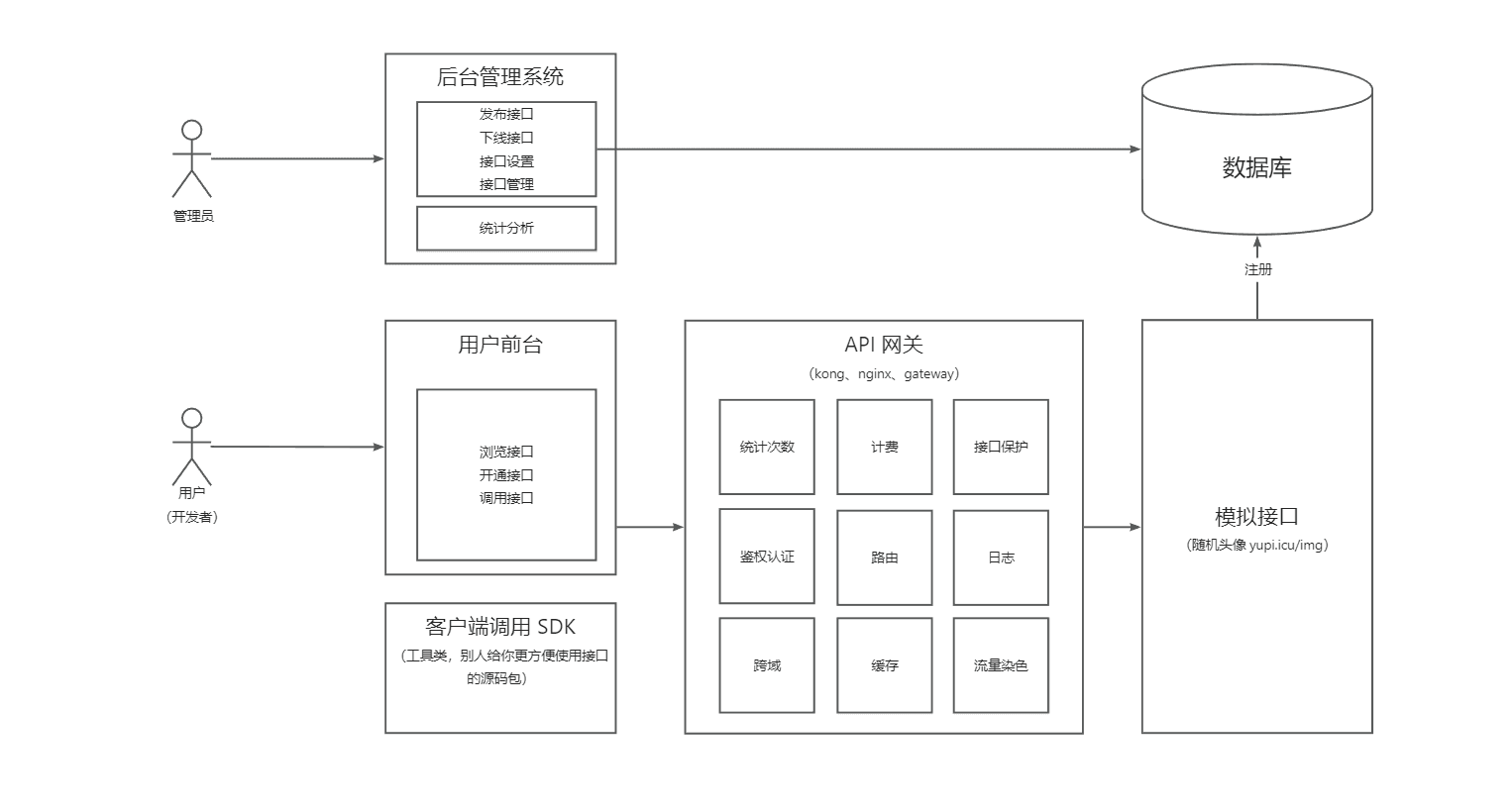
做一个提供API接口调用的平台,用户可以注册登录,开通接口调用权限。用户可以使用接口,并且每次调用会进行统计。管理员可以发布接口、下线接口、接入接口,以及可视化接口的调用情况、数据。
业务流程
技术选型
前端
- React 18
- Ant Design Pro 5.x 脚手架
- Ant Design & Procomponents 组件库
- Umi 4 前端框架
- OpenAPI 前端代码生成
后端
- Java Spring Boot
- MySQL 数据库
- MyBatis-Plus 及 MyBatis X 自动生成
- API 签名认证(Http 调用)
- Spring Boot Starter(SDK 开发)
- Dubbo 分布式(RPC、Nacos)
- Swagger + Knife4j 接口文档生成
- Spring Cloud Gateway 微服务网关
- Hutool、Apache Common Utils、Gson 等工具库
Ant Design Pro
官方文档:https://ant-design-pro.gitee.io/zh-CN/docs/getting-started (opens in a new tab)
前端项目安装启动
yarn install
yarn start
移除国际化
- i18n-remove 报错
- 执行 yarn add eslint-config-prettier --dev
- 执行 yarn add eslint-plugin-unicorn --dev
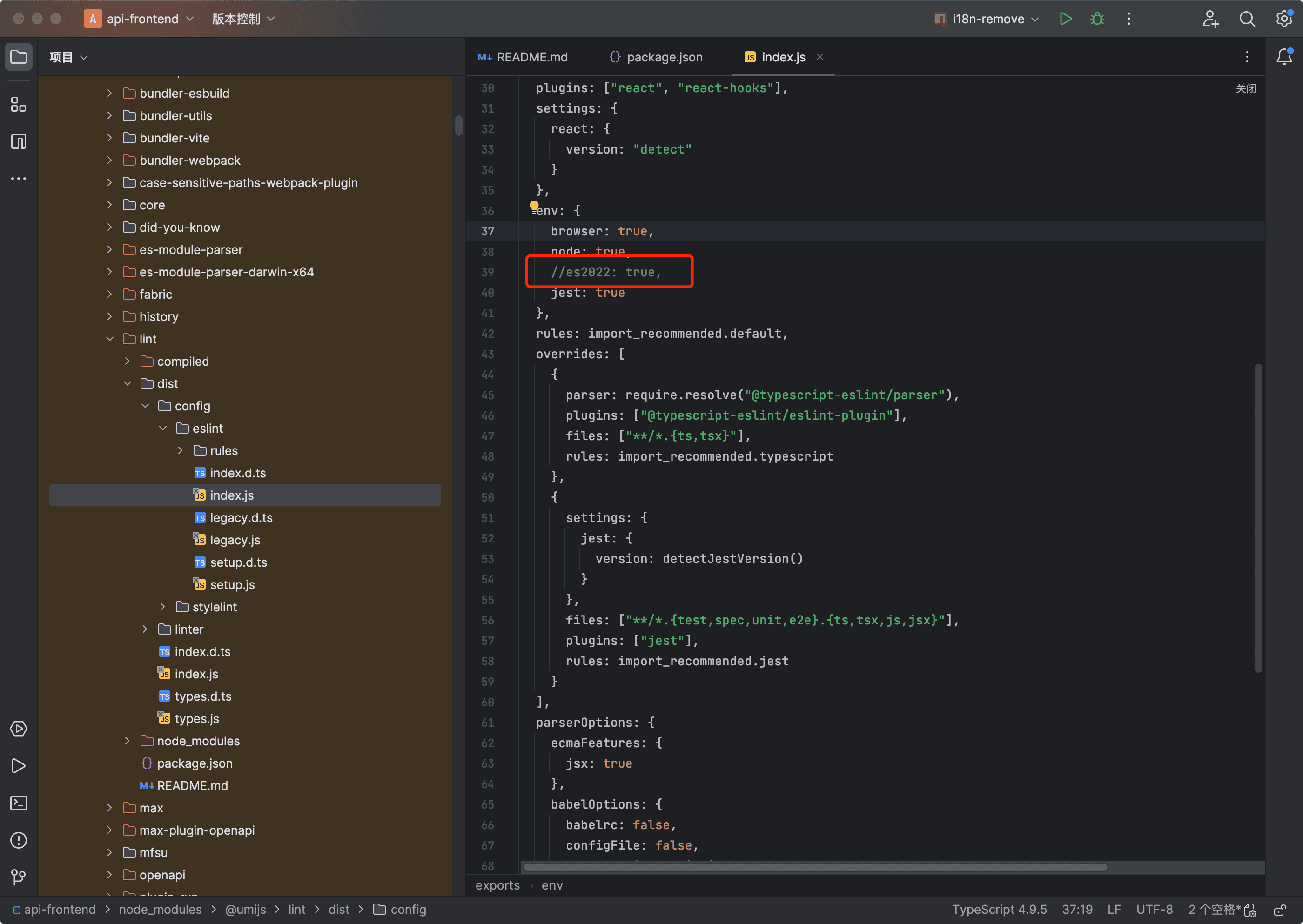
- 修改node_modules/@umijs/lint/dist/config/eslint/index.js文件:注释 // es2022: true
open api生成前端接口调用
- package.json
"openapi": "max openapi",- 配置 config/config.ts
export default defineConfig({
	openAPI: [
        {
          requestLibPath: "import { request } from '@umijs/max'",
            // 后端openapi 地址
          schemaPath: 'http://localhost:8081/v3/api-docs',
          projectName: 'api-backend',
        },
      ],
})
请求配置
- src/requestConfig.ts
export const requestConfig: RequestConfig = {
  // 方式1:跨域访问方式,需要添加配置withCredentials: true, 才能携带cookie
  // baseURL: 'http://localhost:8081',

  // 方式2:公共前缀 + proxy 代理方式 config/proxy.ts
  baseURL: '/api',
}- 完整配置
export const requestConfig: RequestConfig = {
  // 方式1:跨域访问方式,需要添加配置withCredentials: true, 才能携带cookie
  // baseURL: 'http://localhost:8081',
  // 方式2:公共前缀 + proxy 代理方式 config/proxy.ts
  baseURL: '/api',

  // 请求拦截器
  requestInterceptors: [
    (config: RequestOptions) => {
      // 拦截请求配置,进行个性化处理。
      const url = config?.url;
      return { ...config, url };
    },
  ],

  // 响应拦截器
  responseInterceptors: [
    (response) => {
      // 拦截响应数据,进行个性化处理
      // data: res 重新分配参数
      const { data: res } = response as unknown as ResponseStructure;
      if (res?.success === false) {
        notification.error({
          description: '请求错误',
          message: '提示',
        });
        throw Error('请求错误');
      }
      const { code, message, data } = res;
      if (code !== 0) {
        notification.error({
          description: message,
          message: '提示',
        });
        throw Error(message);
      }
      /**
       * TODO 这里返回response,实际后面调用获取的是response.data,也就是{ code, message, data }
       * 官方说通过配置 request.dataField = '' 可以获取原始数据,实际上未生效
       */
      return response;
    },
  ],

  // 携带cookie 跨域请求
  // withCredentials: true,
};
登录
-
src/pages/user/Login/index.tsx
- 核心方法handleSubmit
- 获取用户信息fetchUserInfo,调用src/app.tsx getInitialState() 获取
const Login: React.FC = () => {
  const [userLoginState, setUserLoginState] = useState<API.LoginResult>({});
  const [type, setType] = useState<string>('account');
  const { initialState, setInitialState } = useModel('@@initialState');
  const fetchUserInfo = async () => {
    // 获取userinfo信息,这里调用的fetchUserInfo是个Promisee函数
    const userInfo = await initialState?.fetchUserInfo?.();
    if (userInfo) {
      flushSync(() => {
        setInitialState((s) => ({
          ...s,
          currentUser: userInfo,
        }));
      });
    }
  };
  const handleSubmit = async (values: API.UserLoginRequest) => {
    // 登录
    try {
      // 判断能否正常登录
      const res = await userLoginUsingPOST({
        ...values,
      });
      if (res) {
        const defaultLoginSuccessMessage = '登录成功!';
        notification.success({
          description: defaultLoginSuccessMessage,
          message: '提示',
        });
        // 可以登录,获取用户信息并设置到全局状态
        await fetchUserInfo();
        console.log('fetchUserInfo initialState', initialState);
        const urlParams = new URL(window.location.href).searchParams;
        // setInitialState(res.data);
        console.log('routes', urlParams.get('redirect') || '/');
        history.push(urlParams.get('redirect') || '/');
        return;
      }
    } catch (e) {
      // 如果失败去设置用户错误信息
      const state: API.LoginResult = { status: 'error', type: 'account' };
      setUserLoginState(state);
    }
  };
};
全局用户状态
- src/app.tsx
/**
 * @see  https://umijs.org/zh-CN/plugins/plugin-initial-state
 * 全局状态管理,通过useModel('@@initialState') 获取
 * */
export async function getInitialState(): Promise<{
  settings?: Partial<LayoutSettings>;
  currentUser?: API.LoginUserVO;
  loading?: boolean;
  fetchUserInfo?: () => Promise<API.LoginUserVO | undefined>;
}> {
  // 获取用户信息
  const fetchUserInfo = async () => {
    try {
      const res = await getLoginUserUsingGET();
      console.log('fetchUserInfo res', res);
      return res.data;
    } catch (error) {
      history.push(loginPath);
    }
    return undefined;
  };
  // 如果不是登录页面,执行
  const { location } = history;
  if (location.pathname !== loginPath) {
    const currentUser = await fetchUserInfo();
    return {
      fetchUserInfo,
      currentUser,
      settings: defaultSettings as Partial<LayoutSettings>,
    };
  }
  return {
    fetchUserInfo,
    settings: defaultSettings as Partial<LayoutSettings>,
  };
}

export const layout: RunTimeLayoutConfig = ({ initialState, setInitialState }) => {
  return {
    // 页面路由改变时回调
    onPageChange: () => {
      const { location } = history;
      // 如果没有登录,重定向到 login
      if (!initialState?.currentUser && location.pathname !== loginPath) {
        history.push(loginPath);
      }
    },
  };
};
登出
- src/components/RightContent/AvatarDropdown.tsx
- userLogoutUsingPOST
export const AvatarDropdown: React.FC<GlobalHeaderRightProps> = ({ menu, children }) => {
  /**
   * 退出登录,并且将当前的 url 保存
   */
  const loginOut = async () => {
    await userLogoutUsingPOST();
  }
  ...
路由权限
- src/access.ts
/**
 * @see https://umijs.org/zh-CN/plugins/plugin-access
 * */
export default function access(initialState: { currentUser?: API.LoginUserVO } | undefined) {
  const { currentUser } = initialState ?? {};
  return {
    canAdmin: currentUser && currentUser.userRole === 'admin',
  };
}
User注册
- Mybatis-Plus默认的主键策略是:ASSIGN_ID(使用雪花算法)
@TableName(value = "user")
@Data
public class User implements Serializable {

    /**
     * id
     如果没有配置策略,则默认为ASSIGN_ID
     */
    @TableId(type = IdType.ASSIGN_ID)
    private Long id;
}
ProTable 表单
-
protable通常用来做查询+ 列表的高级组件,但是也可以用来crud,官方文档提供参数type={'form'},来转换为表单,目前使用有bug
-
方式一:request提交:重置表单会重复调用请求,解决方式,onReset函数会先于request调用,onReset设置标志区分是否reset
-
方式二:onSubmit提交(建议使用这种)form 表单init数据
-
form={{
	initialValues: !isAdd ? currentRow : {},
}}
-
-
-
status Integer类型数据回显问题,valueEnum枚举类型,如果key是数字,回显会直接显示数字
- 暂时解决方式 ,提前赋值为字符串,record.status += '';
-
Add/Update Form表单组件
-
封装单独组件
 {/* add or update form */}
<EditForm
    isAdd={isAdd}
    open={open}
    onCancel={cancel}
    onSubmit={submit}
    currentRow={currentRow}
    columns={columns}
    />
-
-
modal表单中传入值的问题:ProTable中会初始化一次属性,再次打开时候,组件已经赋值,所以有两种解决方式,要么监听外层属性变化,然后重新为表单赋值,要么销毁modal,下次打开重新加载数据
-
方式一:监听
// ProForm ref const ref = useRef<ProFormInstance>(); // 类似Vue watch, 参数:(执行某个函数,监听的属性列表) useEffect(() => { // 当外层传入值发生改变时重新设置表单值 ref?.current?.setFieldsValue(currentRow); }, [currentRow]); -
方式二:直接销毁modal
 <Modal
      ...
      destroyOnClose={true}
    >
-
服务端
maven子项目总览
- api-admin 后端管理,为前端项目提供数据支持
- 用户登录,session存储用户状态
- 接口api的增删改查
- api-client-demo 集成starter的测试客户端
- 测试通过给定的ak ,sk以及starter提供的客户端能否成功调用服务端接口
- api-client-sdk ApiClient sdk
- 提供访问api接口的功能
- api-client-sdk-autoconfiguration 自动配置ApiClient
- api-client-sdk-starter 集成sdk starter
- api-common 公共类库
- api-gateway
- api网关,主要实现了白名单,api鉴权和日志打印的功能
- api-gateway-mock
- 为gateway提供接口模拟测试
- api-interface api提供服务端
- 提供对外访问接口
- 通过拦截器判断是否是合法的api访问请求
代码生成
- 插件 MybatisX
- options Actual Column 与库表一致
- mybatis-plus3
Knife4j 接口文档配置
/**
 * Knife4j 接口文档配置
 * https://doc.xiaominfo.com/knife4j/documentation/get_start.html
 */
@Configuration
@EnableSwagger2
@Profile({"dev", "test"})
public class Knife4jConfig {

    @Bean
    public Docket defaultApi2() {
        return new Docket(DocumentationType.OAS_30)
                .apiInfo(new ApiInfoBuilder()
                        .title("接口文档")
                        .description("api-backend")
                        .version("1.0")
                        .build())
                .select()
                // 指定 Controller 扫描包路径
                .apis(RequestHandlerSelectors.basePackage("io.web.api.controller"))
                .paths(PathSelectors.any())
                .build();
    }
}
BeanValidation简化参数校验
- maven依赖
<!-- bean validation-->
<dependency>
    <groupId>javax.validation</groupId>
    <artifactId>validation-api</artifactId>
    <version>2.0.1.Final</version>
</dependency>
<dependency>
    <groupId>org.hibernate.validator</groupId>
    <artifactId>hibernate-validator</artifactId>
    <version>6.0.11.Final</version>
    <scope>compile</scope>
</dependency>- BeanValidation快速失败配置(一个校验失败直接抛出)
@Configuration
public class BeanValidationConfig {

    @Bean
    public Validator validator() {
        ValidatorFactory factory = Validation.byProvider(HibernateValidator.class)
                .configure()
                .failFast(true)
                .buildValidatorFactory();
        return factory.getValidator();
    }
}
接口调用
-
HttpClient
-
RestTemplate
-
Hutools
API签名认证
本质:
- 签发签名
- 校验签名
实现方式
为用户分配ak和sk,在进行api调用时,验证用户传递的和数据库分配的值是否一致
- AccessKey
- SecretKey
参数
- 参数1:nonce 随机数
- 参数2:用户参数
- 参数3:时间戳
- 参数4:ak
- 参数5:sign 用户参数 + 密钥(sk) => 签名算法 => 不可解密的加密值
防重放?
nonce随机数,只能用一次,服务端要保存随机数
加timestamp时间戳,校验时间戳是否过期
接口发布下线
发布接口(admin)
- 接口是否存在
- 是否可以调用
- 修改状态为1
下线接口(admin)
- 接口是否存在
- 状态为0
接口模拟调试调用
网关
- 统一接受和分发请求
- 鉴权
- 跨域
- 缓存
- 流量染色
- 访问控制
- 统一业务处理
- 发布控制
- 负载均衡
- 接口保护
- 限流
- 脱敏
- 降级
- 超时
- 统一日志
- 统一文档
网关分类
- 全局网关(接入层网关):负载均衡
- 业务网关(微服务网关):请求转发到不同的项目/业务/接口/服务
实现
- Nginx(全局)、Kong(API网关)
- Spring Cloud Gateway(取代了Zuul)、高性能
Spring Cloud Gateway
https://spring.io/projects/spring-cloud-gateway#overview (opens in a new tab)
maven依赖
<spring-cloud.version>2021.0.7</spring-cloud.version>

<dependencyManagement>
    <dependency>
        <groupId>org.springframework.cloud</groupId>
        <artifactId>spring-cloud-dependencies</artifactId>
        <version>${spring-cloud.version}</version>
        <type>pom</type>
        <scope>import</scope>
    </dependency>
</dependencyManagement>

<dependencies>
        <dependency>
            <groupId>org.springframework.cloud</groupId>
            <artifactId>spring-cloud-starter-gateway</artifactId>
        </dependency>
        <dependency>
            <groupId>org.springframework.boot</groupId>
            <artifactId>spring-boot-starter-test</artifactId>
            <scope>test</scope>
        </dependency>
    </dependencies>
配置断言和过滤器的两种方式
-
Shortcut 快捷方式
spring: cloud: gateway: routes: - id: after_route uri: https://example.org predicates: // 满足这个断言,cookie的名称是mycookie,value是mycookievalue - Cookie=mycookie,mycookievalue -
Fully Expand Arguments 参数展开
spring:
  cloud:
    gateway:
      routes:
      - id: after_route
        uri: https://example.org
        predicates:
        - name: Cookie
          args:
            name: mycookie
            regexp: mycookievalue
断言工厂
-
Afterroute predicate factory 在什么时间后 -
Beforeroute predicate factory 什么时间前 -
Betweenroute predicate factory 给定时间之间 -
Cookieroute predicate factory takes two parameters, the cookienameand aregexp(which is a Java regular expression). 给定Cookie -
Headerroute predicate factory takes two parameters, theheaderand aregexp请求头 -
Hostroute predicate factory takes one parameter: a list of host namepatterns域名 -
MethodRoute Predicate Factory takes amethodsargument which is one or more parameters: the HTTP methods to match. 给定http请求 -
PathRoute Predicate Factoryspring: cloud: gateway: routes: - id: path_route uri: https://example.org predicates: - Path=/red/{segment},/blue/{segment}-
This route matches if the request path was, for example:
/red/1or/red/1/or/red/blueor/blue/green. -
If
matchTrailingSlashis set tofalse, then request path/red/1/will not be matched. 不匹配行尾斜线 -
ServerWebExchange.getAttributes() + ServerWebExchangeUtils.URI_TEMPLATE_VARIABLES_ATTRIBUTE 获取 segment的值,或者
Map<String, String> uriVariables = ServerWebExchangeUtils.getUriTemplateVariables(exchange);

String segment = uriVariables.get("segment");
-
-
Queryroute predicate factory- Query=green
- Query=red, gree. 参数名称是red,值是gree. ,so
greenandgreetwould match.
-
RemoteAddrroute predicate factory -
Weightroute predicate factory takes two arguments:groupandweight(an int). 权重spring: cloud: gateway: routes: - id: weight_high uri: https://weighthigh.org predicates: - Weight=group1, 8 - id: weight_low uri: https://weightlow.org predicates: - Weight=group1, 2 -
XForwarded Remote Addrroute predicate factory takes a list (min size 1) ofsources
过滤器工厂
-
AddRequestHeaderGatewayFilterfactory takes anameandvalueparameter -
AddRequestHeadersIfNotPresentGatewayFilterfactory takes a collection ofnameandvaluepairs separated by colon (冒号) -
AddRequestParameterGatewayFilterFactory takes anameandvalueparameter. -
AddResponseHeaderGatewayFilterFactory takes anameandvalueparameter -
Spring Cloud CircuitBreaker GatewayFilter
- To enable the Spring Cloud CircuitBreaker filter, you need to place
spring-cloud-starter-circuitbreaker-reactor-resilience4jon the classpath. 需要引入resilience4j
- To enable the Spring Cloud CircuitBreaker filter, you need to place
-
trip a circuit breaker based on the status code 根据状态码触发断路器
-
Some situations necessitate reading the request body. 有些情况需要读取请求体。 请求只能被读取一次,使用 CacheRequestBody 缓存请求体
-
DedupeResponseHeaderGatewayFilter factory takes anameparameter and an optionalstrategyparameter. -
FallbackHeaders 允许您在转发到外部应用程序中的fallbackUri的请求头中添加Spring Cloud CircuitBreaker执行异常细节
-
The JSONToGRPCFilter GatewayFilter Factory converts a JSON payload to a gRPC request.
-
LocalResponseCache 响应缓存,规则
- 无主体GET请求。
- 指定响应码 200、206、301
- Cache-Control报头不允许(请求中没有存储或响应中没有存储或私有),则不缓存响应数据。
- 如果响应已经被缓存,并且在新请求Cache-Control头中 no-cache ,它将返回一个带有304(未修改)的无实体响应。
-
The
MapRequestHeaderGatewayFilterfactory takesfromHeaderandtoHeaderparameters. -
You can use the
ModifyRequestBodyfilter to modify the request body before it is sent downstream by the gateway. 修改请求体 -
You can use the
ModifyResponseBodyfilter to modify the response body before it is sent back to the client.修改响应体 -
The
PrefixPathGatewayFilterfactory takes a singleprefixparameter. The following example configures aPrefixPathGatewayFilter: 添加请求前缀 -
PreserveHostHeaderGatewayFilter -
RedirectToGatewayFilter重定向 -
RemoveJsonAttributesResponseBodyGatewayFilterfactory takes a collection ofattribute namesto search for, 删除responsebody中的属性,最后一个参数可选(true则递归删除属性) -
RemoveRequestHeaderGatewayFilterfactory takes anameparameter. -
RemoveRequestParameterGatewayFilterfactory takes anameparameter -
RemoveResponseHeaderGatewayFilterfactory takes anameparameter -
RequestHeaderSizeGatewayFilterfactory takesmaxSizeanderrorHeaderNameparameters. -
RequestRateLimiterGatewayFilterfactory uses aRateLimiterimplementation to determine if the current request is allowed to proceed-
KeyResolver
-
Redis RateLimiter, 添加
spring-boot-starter-data-redis-reactiveSpring Boot starter.- The
redis-rate-limiter.replenishRateproperty defines how many requests per second to allow ,填充速率配置,允许每秒执行的请求 - The
redis-rate-limiter.burstCapacityproperty 用户在一秒钟内允许的最大请求数(不丢弃任何请求)。 这是令牌桶可以容纳的令牌数量。将此值设置为零将阻止所有请求。 - The
redis-rate-limiter.requestedTokensproperty 请求花费的令牌数量 , 这是为每个请求从桶中获取的令牌数量,默认为1。
- The
-
-
RewriteLocationResponseHeaderGatewayFilter -
RewritePathGatewayFilterfactory/red/blue, this sets the path to/blue
spring: cloud: gateway: routes: - id: rewritepath_route uri: https://example.org predicates: - Path=/red/** filters: - RewritePath=/red/?(?<segment>.*), /$\{segment} -
RewriteResponseHeaderGatewayFilter -
SaveSessionGatewayFilterfactory forces aWebSession::save -
SecureHeadersGatewayFilterfactory -
SecureHeadersGatewayFilterfactoryspring: cloud: gateway: routes: - id: setpath_route uri: https://example.org predicates: - Path=/red/{segment} filters: - SetPath=/{segment} -
SetRequestHeaderGatewayFilter -
SetResponseHeaderGatewayFilter -
SetStatusGatewayFilterfactory -
StripPrefixGatewayFilter删掉前缀spring: cloud: gateway: routes: - id: nameRoot uri: https://nameservice predicates: - Path=/name/** filters: - StripPrefix=2 -
RetryGatewayFilter重试 -
RequestSizeGatewayFilter请求大小spring: cloud: gateway: routes: - id: request_size_route uri: http://localhost:8080/upload predicates: - Path=/upload filters: - name: RequestSize args: maxSize: 5000000 -
SetRequestHostHeaderGatewayFilter -
TokenRelayGatewayFilterFactory
-
Default Filters
- To add a filter and apply it to all routes, you can use
spring.cloud.gateway.default-filters
spring: cloud: gateway: default-filters: - AddResponseHeader=X-Response-Default-Red, Default-Blue - PrefixPath=/httpbin - To add a filter and apply it to all routes, you can use
GlobalFilter
@Bean
public GlobalFilter customFilter() {
    return new CustomGlobalFilter();
}

public class CustomGlobalFilter implements GlobalFilter, Ordered {

    @Override
    public Mono<Void> filter(ServerWebExchange exchange, GatewayFilterChain chain) {
        log.info("custom global filter");
        return chain.filter(exchange);
    }

    @Override
    public int getOrder() {
        return -1;
    }
}
GlobalFilter 和GatewayFilter
Global Filters:全局过滤器,不需要配置路由,系统初始化作用到所有路由上。
GatewayFilter:需要配置某个路由,才能过滤。如果需要使用全局路由,需要配置Default Filters。
RPC
- Http、TCP
- Dubbo
- Open feign
Feign
使用eureka注册中心方式
官方示例:https://github.com/spring-cloud-samples/feign-eureka.git (opens in a new tab)
- 要自行启动eureka注册中心
- 项目依赖的是 3.0.6版本的springboot,jdk要17
- 依赖 pom.xml
<dependencies>
    <!-- eureka-server -->
    <dependency>
        <groupId>org.springframework.cloud</groupId>
        <artifactId>spring-cloud-starter-netflix-eureka-server</artifactId>
    </dependency>
    <!-- openfeign -->
    <dependency>
        <groupId>org.springframework.cloud</groupId>
        <artifactId>spring-cloud-starter-openfeign</artifactId>
    </dependency>
</dependencies>- application.yml
spring:
  application:
    name: eureka-server
server:
  port: 8761

eureka:
  instance:
    prefer-ip-address: true
  client:
    register-with-eureka: false
    fetch-registry: false
  server:
    enable-self-preservation: false
- 启动类
@EnableEurekaServer //通过注解触发自动配置
@SpringBootApplication
public class EurekaApplication {
    public static void main(String[] args) {
        SpringApplication.run(EurekaApplication.class, args);
    }
}
不用注册中心,直接访问服务
feign配置,name是毕传的,url服务提供方地址
@FeignClient(name = "${feign.name}", url = "${feign.url}")Feign 配置
项目计划
第一期——初始化和展示
项目介绍、设计、技术选型
基础项目的搭建
接口管理
用户查看接口
第二期——接口调用
接口调用
接口文档展示、接口在线调用
保证调用的安全性**(API签名认证)**
客户端SDK的开发
第三期——接口计费与保护
统计用户调用次数
限流
计费
日志
开通
第四期——管理、统计分析
提供可视化平台,用图表的方式展示所有接口的调用情况,便于调整业务。
需求分析
-
管理员可以对接口信息进行增删改查
-
用户可以访问前台,查看接口信息
流程
- 项目脚手架搭建(初始化项目)10分钟前端Ant Design Pro、5-10分钟后端。
- 管理员可以对接口信息进行增删改查
- 用户可以访问前台,查看接口信息
数据库表设计
自动生成 SQL之父
接口信息表
驼峰式:保证前后端完全一致
id 主键
name接口名称
description 描述
url 接口地址
type 请求类型
requestHeader 请求头
reponseHeader 响应头
status 接口状态(0-关闭,1-开启)
method 请求类型
userId 创建人
createTime 创建时间
updateTime 更新时间
isDelete 是否删除(0-未删, 1-已删)
-- 接口信息
create table if not exists caapi.`interface_info`
(
`id` bigint not null auto_increment comment '主键' primary key,
`name` varchar(256) not null comment '名称',
`discription` varchar(256) null comment '描述',
`url` varchar(512) not null comment '接口地址',
`requestHeader` text null comment '请求头',
`reponseHeader` text null comment '响应头',
`status` int default 0 not null comment '接口状态(0-关闭,1-开启)',
`method` varchar(256) not null comment '请求类型',
`userId` bigint not null comment '创建人',
`createTime` datetime default 'CURRENT_TIMESTAMP' not null comment '创建时间',
`updateTime` datetime default 'CURRENT_TIMESTAMP' not null on update CURRENT_TIMESTAMP comment '更新时间',
`isDelete` tinyint default 0 not null comment '是否删除(0-未删, 1-已删)'
) comment '接口信息';

insert into caapi.`interface_info` (`name`, `discription`, `url`, `requestHeader`, `reponseHeader`, `status`, `method`, `userId`) values ('马展鹏', '朱锦程', 'www.ludivina-jones.net', '戴鸿煊', '杨皓轩', 0, '郝思源', 3123743175);
insert into caapi.`interface_info` (`name`, `discription`, `url`, `requestHeader`, `reponseHeader`, `status`, `method`, `userId`) values ('郭天翊', '梁峻熙', 'www.alida-wilkinson.co', '白浩宇', '廖浩宇', 0, '尹浩宇', 75094848);
insert into caapi.`interface_info` (`name`, `discription`, `url`, `requestHeader`, `reponseHeader`, `status`, `method`, `userId`) values ('沈明杰', '姜潇然', 'www.rosalba-osinski.info', '洪昊然', '何思远', 0, '史航', 19363792);
insert into caapi.`interface_info` (`name`, `discription`, `url`, `requestHeader`, `reponseHeader`, `status`, `method`, `userId`) values ('白乐驹', '曾致远', 'www.gerri-legros.info', '杜博超', '姜涛', 0, '廖天磊', 633961);
insert into caapi.`interface_info` (`name`, `discription`, `url`, `requestHeader`, `reponseHeader`, `status`, `method`, `userId`) values ('孔熠彤', '白明杰', 'www.quinn-huel.net', '夏烨伟', '冯语堂', 0, '黄鹏煊', 2198577893);
insert into caapi.`interface_info` (`name`, `discription`, `url`, `requestHeader`, `reponseHeader`, `status`, `method`, `userId`) values ('马旭尧', '谭煜祺', 'www.laurel-upton.co', '阎懿轩', '董雪松', 0, '洪楷瑞', 138404681);
insert into caapi.`interface_info` (`name`, `discription`, `url`, `requestHeader`, `reponseHeader`, `status`, `method`, `userId`) values ('龚煜祺', '丁语堂', 'www.alan-kris.io', '孔建辉', '武皓轩', 0, '毛皓轩', 5);
insert into caapi.`interface_info` (`name`, `discription`, `url`, `requestHeader`, `reponseHeader`, `status`, `method`, `userId`) values ('方荣轩', '程嘉熙', 'www.stacey-gutkowski.net', '姚嘉熙', '蔡昊焱', 0, '何伟诚', 161);
insert into caapi.`interface_info` (`name`, `discription`, `url`, `requestHeader`, `reponseHeader`, `status`, `method`, `userId`) values ('胡旭尧', '傅雪松', 'www.freddie-wyman.co', '吕昊焱', '严弘文', 0, '蔡绍齐', 1);
insert into caapi.`interface_info` (`name`, `discription`, `url`, `requestHeader`, `reponseHeader`, `status`, `method`, `userId`) values ('钱懿轩', '赖君浩', 'www.beau-lubowitz.co', '郝果', '郝浩宇', 0, '侯修洁', 54272);
insert into caapi.`interface_info` (`name`, `discription`, `url`, `requestHeader`, `reponseHeader`, `status`, `method`, `userId`) values ('萧博超', '郑靖琪', 'www.sherrie-kiehn.com', '萧正豪', '张凯瑞', 0, '余嘉懿', 60673151);
insert into caapi.`interface_info` (`name`, `discription`, `url`, `requestHeader`, `reponseHeader`, `status`, `method`, `userId`) values ('韩博涛', '卢晓啸', 'www.renata-friesen.com', '潘梓晨', '曹鹏', 0, '徐嘉熙', 3836610999);
insert into caapi.`interface_info` (`name`, `discription`, `url`, `requestHeader`, `reponseHeader`, `status`, `method`, `userId`) values ('程弘文', '丁君浩', 'www.jermaine-kozey.net', '郑俊驰', '范智渊', 0, '丁果', 71);
insert into caapi.`interface_info` (`name`, `discription`, `url`, `requestHeader`, `reponseHeader`, `status`, `method`, `userId`) values ('孔琪', '戴炎彬', 'www.ilona-bogan.info', '姜楷瑞', '朱智渊', 0, '孔靖琪', 721840);
insert into caapi.`interface_info` (`name`, `discription`, `url`, `requestHeader`, `reponseHeader`, `status`, `method`, `userId`) values ('陆弘文', '薛志强', 'www.marina-crooks.io', '崔鸿煊', '陈峻熙', 0, '梁瑾瑜', 59634352);
insert into caapi.`interface_info` (`name`, `discription`, `url`, `requestHeader`, `reponseHeader`, `status`, `method`, `userId`) values ('于弘文', '曹鹤轩', 'www.rosario-grady.io', '郭煜祺', '郑鹏飞', 0, '蒋楷瑞', 3);
insert into caapi.`interface_info` (`name`, `discription`, `url`, `requestHeader`, `reponseHeader`, `status`, `method`, `userId`) values ('龚懿轩', '薛绍辉', 'www.matha-bauch.org', '卢果', '叶煜城', 0, '彭立果', 88610617);
insert into caapi.`interface_info` (`name`, `discription`, `url`, `requestHeader`, `reponseHeader`, `status`, `method`, `userId`) values ('雷建辉', '叶风华', 'www.jeri-waelchi.com', '胡峻熙', '张越泽', 0, '叶雨泽', 17);
insert into caapi.`interface_info` (`name`, `discription`, `url`, `requestHeader`, `reponseHeader`, `status`, `method`, `userId`) values ('钱修杰', '邱昊天', 'www.conception-mcglynn.io', '田浩轩', '陈浩', 0, '贺晓博', 4156);
insert into caapi.`interface_info` (`name`, `discription`, `url`, `requestHeader`, `reponseHeader`, `status`, `method`, `userId`) values ('徐思淼', '金果', 'www.rex-renner.org', '谭明', '莫峻熙', 0, '史乐驹', 70469868);
生成接口信息增删改查代码:插件 Mybatisx
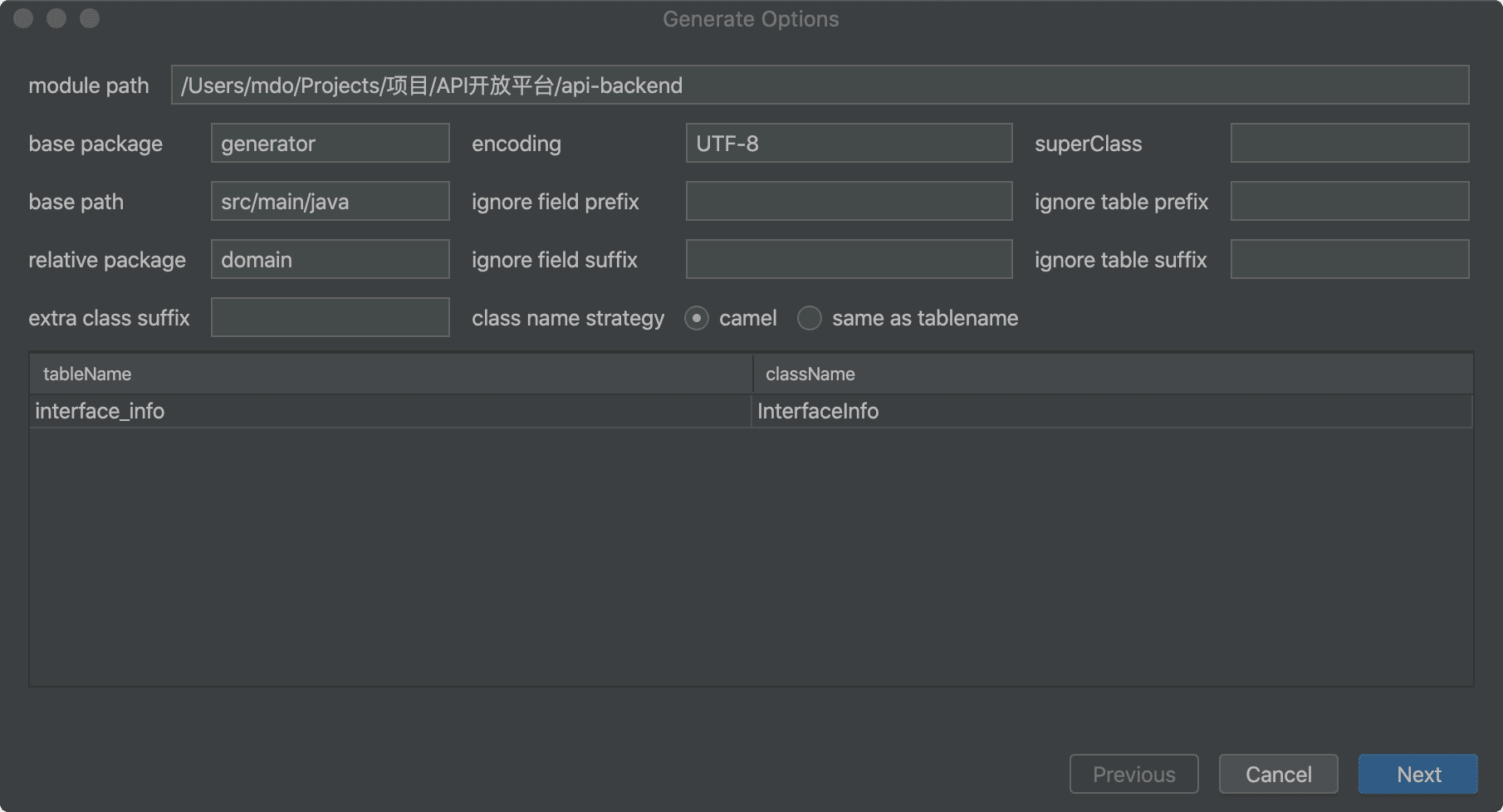
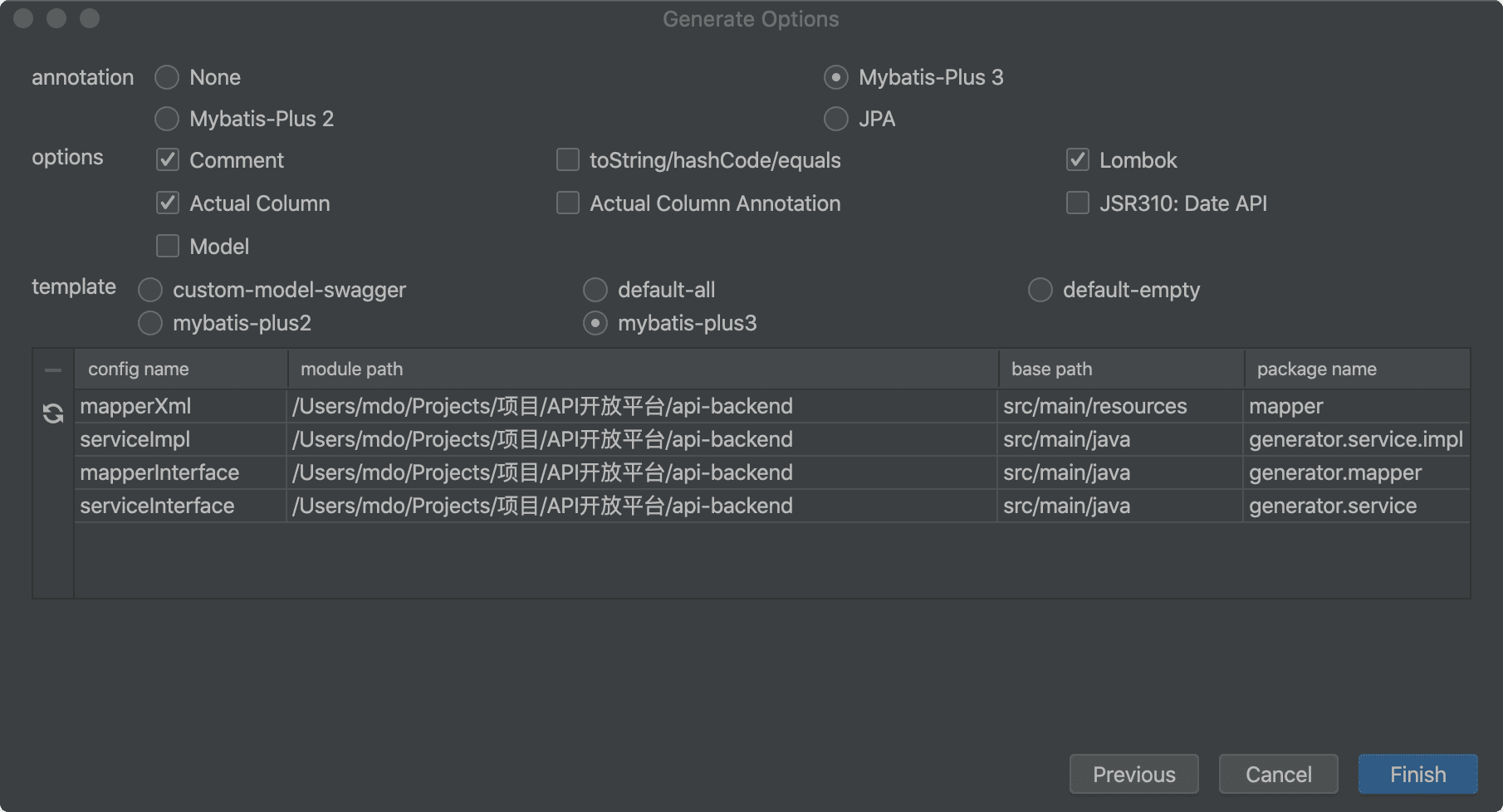
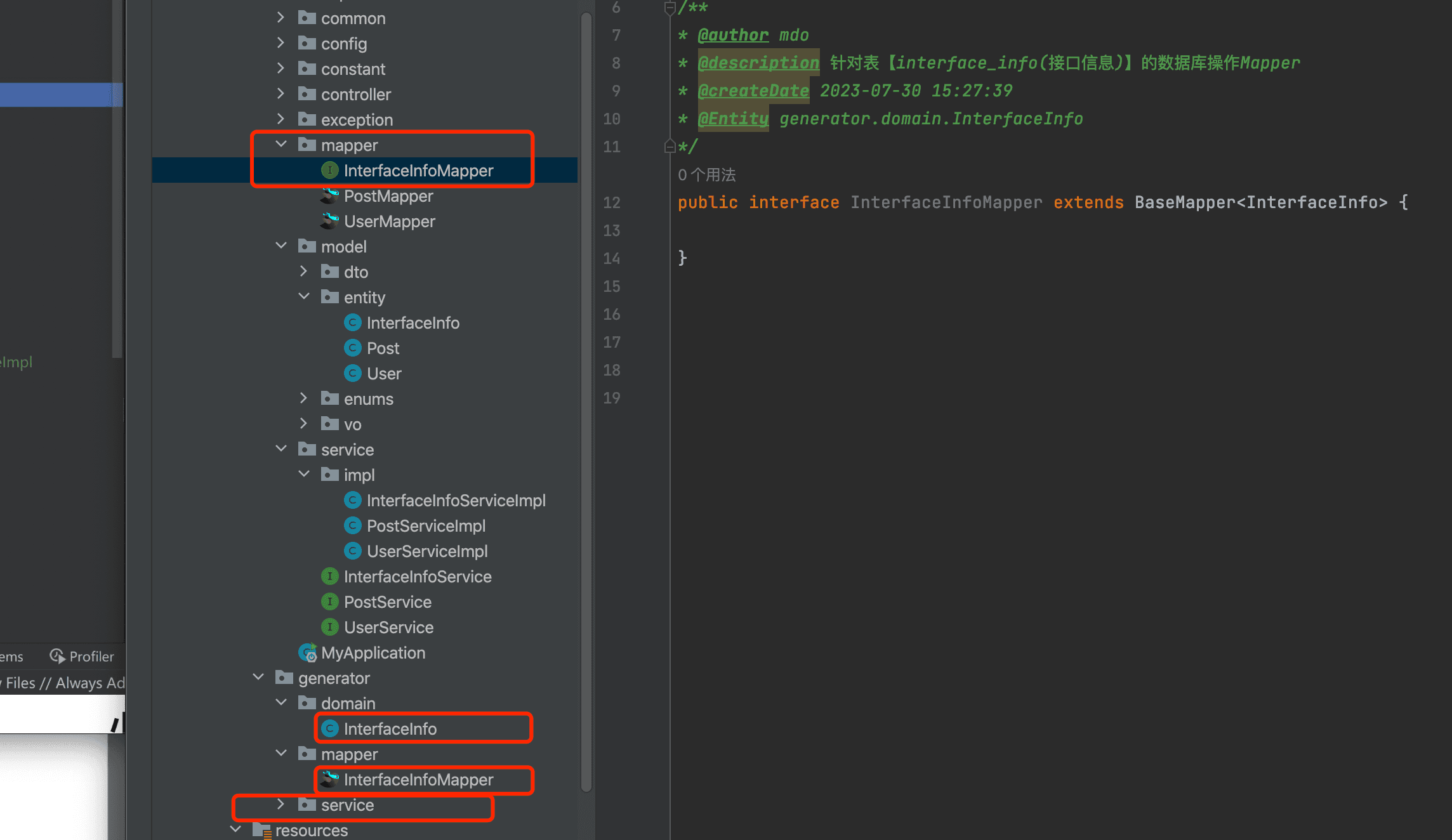
自动生成getter:快速生成从该字段取信息
中心方法使用MyBatis-Plus框架中对 CRUD (创建、读取、更新、删除)操作的封装方法。
addInterfaceInfo方法使用了save方法,它用来插入一条记录。deleteInterfaceInfo方法使用了removeById方法,它用于根据 id 删除一条记录。updateInterfaceInfo方法使用了updateById方法,它用于通过 id 更新一条记录。getInterfaceInfoById方法使用了getById方法,它用于通过 id 获取一条记录。listInterfaceInfo方法使用了list方法,它用于获取所有记录。listInterfaceInfoByPage方法使用了page方法,它被用于分页查询记录。
前端Ant Design Pro
踩坑
移除国际化
npm i @typescript-eslint/eslint-plugin
npm i eslint-plugin-eslint-comments
npm i eslint-plugin-jest
npm i eslint-plugin-unicorn
src/app.tsx 核心入口
项目脚手架
后端:
.husky提交代码做一个检测
config项目配置
mock模拟数据、接口测试
public静态资源文件
src源码目录
tests测试
playwright自动化测试
前端:ant design pro 脚手架
基础功能
增删改查、登陆(复制粘贴)
前端接口调用:opeapi插件自动生成
openapi同步并且降低沟通成本
ProTable组件
InterfaceInfo接口
| 名称 | 类型 | 说明 | schema |
|---|---|---|---|
| createTime | string(date-time) | ||
| discription | string | ||
| id | integer(int64) | ||
| isDelete | integer(int32) | ||
| method | string | ||
| name | string | ||
| reponseHeader | string | ||
| requestHeader | string | ||
| status | integer(int32) | ||
| updateTime | string(date-time) | ||
| url | string | ||
| userId | integer(int64) |
render渲染类型:默认文本
默认:textarea富文本编辑器
接口文档展示、接口在线调用
状态码校验requestConfig.ts:响应拦截端口设置
保证调用的安全性**(API签名认证)**
客户端SDK的开发 springbootstarter
统计用户调用次数
限流
计费
日志
开通